设为首页收藏本站

LUPA开源社区

 找回密码
 注册
文章 帖子 博客
LUPA开源社区 › 首页 ›业界资讯› 技术文摘 › 查看内容

JavaScript:如何在对象中嵌入私有成员

2015-7-11 18:53| 发布者: joejoe0332| 查看: 1607| 评论: 0|原作者: gx老苗|来自: oschina

摘要: 最近,我开发一个项目 Angular Cloud Data Connector, 帮助Angular开发者使用云数据,特别是 Azure移动服务, 使用WEB标准,像索引数据库(indexed DB)。我尝试建立一种方式,使得JavaScript开发者能将私有成员嵌入到 ...

  最近,我开发一个项目 Angular Cloud Data Connector, 帮助Angular开发者使用云数据,特别是 Azure移动服务, 使用WEB标准,像索引数据库(indexed DB)。我尝试建立一种方式,使得JavaScript开发者能将私有成员嵌入到一个对象中。 


  我解决这个问题的技术用到了我命名的闭包空间(closure space)。在这篇入门文章中,我要分享的是如何在你的项目中用它,及它对主流浏览器的性能和内存的影响。


  在深入学习前,咱们先说下,你为什么需要用到私有成员(private members), 还有一种替代方式来模拟私有成员。


  如果你想点评本文,尽情推(twitter)我: @deltakosh。


1. 为何要用私有成员(Private Members)


  当你用JavaScript 创建一个对象时,可以声明值成员(value members)。 如果你打算控制对它们的读/写访问操作,可以如下声明:


1
2
3
4
5
6
7
8
9
10
11
var entity = {};
  
entity._property = "hello world";
Object.defineProperty(entity, "property", {
    get: function () { return this._property; },
    set: function (value) {
        this._property = value;
    },
    enumerable: true,
    configurable: true
});


  这样实现,你能完全控制读和写操作。问题在于_property 成员仍然可以直接访问和修改。


  这也就是为何我们需要更加稳定可靠的方式,声明私有成员,它智能通过对象的方法来访问。


2. 使用闭包空间(Closure Space)

  解决方法是使用闭包空间。每当内部函数 (inner fanction) 访问来自外部函数作用域的变量时,浏览器为你分配一段内存空间。有时很取巧,不过就我们的题目来讲,这算是一个完美的解决方案。


1
2
3
4
5
6
7
8
9
10
11
12
13
14
我们在上个代码版本中添加这个特性:
var createProperty = function (obj, prop, currentValue) 
{
    Object.defineProperty(obj, prop, 
    {
            get: function () { return currentValue; },
            set: function (value) {
            currentValue = value;
                    },
                    enumerable: true,
                    configurable: true    });
                    } 
var entity = {}; 
var myVar = "hello world";createProperty(entity, "property", myVar);


  示例中,createProperty 函数有一个 currentValue 变量,存在 get 和 set 方法。此变量会保存到 get 和 set 函数的闭包空间中。现在,只有这两个函数能看到和更新 currentValue 变量! 任务完成!


  唯一需要警惕 caveat,警告,注意)的是源值 (myVar) 仍可访问。下面给出另一个更健壮的版本(保护 myVar 变量):


1
2
3
4
5
6
7
8
9
10
11
12
13
14
15
16
17
var createProperty = function (obj, prop) {
    var currentValue = obj[prop];
    Object.defineProperty(obj, prop, {
        get: function () { return currentValue; },
        set: function (value) {
            currentValue = value;
        },
        enumerable: true,
        configurable: true
    });
}
  
var entity = {
    property: "hello world"
};
  
createProperty(entity, "property");


  采用该函数, 即便源值都销毁(destructed,注:意思是不能直接赋值)了。到此大功告成了!


3. 性能考虑Performance Considerations

现在咱们看看性能。

很明显,比起一个简单的变量,闭包空间,甚或(对象)属性要慢的多,且更消耗资源。这就是本文更多关注普通方式和闭包空间机制差异的原因。

为证明闭包空间机制并不比标准方式更消耗资源, 我写了下面代码做个基准测试:

1
2
3
4
5
6
7
8
9
10
11
12
13
14
15
16
17
18
19
20
21
22
23
24
25
26
27
28
29
30
31
32
33
34
35
36
37
38
39
40
41
42
43
44
45
46
47
48
49
50
51
52
53
54
55
56
57
58
59
60
61
62
63
64
65
66
67
68
69
70
71
72
73
74
75
76
77
78
79
80
81
82
83
84
85
86
87
88
89
90
91
92
93
94
95
96
97
98
99
100
<!DOCTYPE html>
<html xmlns="http://www.w3.org/1999/xhtml">
<head>
    <title></title>
</head>
<style>
    html {
        font-family: "Helvetica Neue", Helvetica;
    }
</style>
<body>
    <div id="results">Computing...</div>
    <script>
        var results = document.getElementById("results");
        var sampleSize = 1000000;
        var opCounts = 1000000;
  
        var entities = [];
  
        setTimeout(function () {
            // Creating entities
            for (var index = 0; index < sampleSize; index++) {
                entities.push({
                    property: "hello world (" + index + ")"
                });
            }
  
            // Random reads
            var start = new Date().getTime();
            for (index = 0; index < opCounts; index++) {
                var position = Math.floor(Math.random() * entities.length);
                var temp = entities[position].property;
            }
            var end = new Date().getTime();
  
            results.innerHTML = "<strong>Results:</strong><br>Using member access: <strong>" + (end - start) + "</strong> ms";
        }, 0);
  
        setTimeout(function () {
            // Closure space =======================================
            var createProperty = function (obj, prop, currentValue) {
                Object.defineProperty(obj, prop, {
                    get: function () { return currentValue; },
                    set: function (value) {
                        currentValue = value;
                    },
                    enumerable: true,
                    configurable: true
                });
            }
            // Adding property and using closure space to save private value
            for (var index = 0; index < sampleSize; index++) {
                var entity = entities[index];
  
                var currentValue = entity.property;
                createProperty(entity, "property", currentValue);
            }
  
            // Random reads
            var start = new Date().getTime();
            for (index = 0; index < opCounts; index++) {
                var position = Math.floor(Math.random() * entities.length);
                var temp = entities[position].property;
            }
            var end = new Date().getTime();
  
            results.innerHTML += "<br>Using closure space: <strong>" + (end - start) + "</strong> ms";
        }, 0);
  
        setTimeout(function () {
            // Using local member =======================================
            // Adding property and using local member to save private value
            for (var index = 0; index < sampleSize; index++) {
                var entity = entities[index];
  
                entity._property = entity.property;
                Object.defineProperty(entity, "property", {
                    get: function () { return this._property; },
                    set: function (value) {
                        this._property = value;
                    },
                    enumerable: true,
                    configurable: true
                });
            }
  
            // Random reads
            var start = new Date().getTime();
            for (index = 0; index < opCounts; index++) {
                var position = Math.floor(Math.random() * entities.length);
                var temp = entities[position].property;
            }
            var end = new Date().getTime();
  
            results.innerHTML += "<br>Using local member: <strong>" + (end - start) + "</strong> ms";
        }, 0);
  
    </script>
</body>
</html>


我创建了一百万个对象,都有属性成员。要完成下面三个测试:

  • 执行 1百万次随机访问属性。

  • 执行1百万次随机访问闭包空间实现版本。

  • 执行1百万次随机访问常规get/set实现版本。

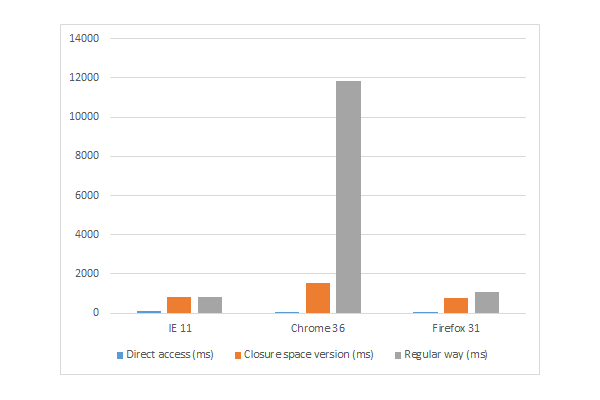
测试结果参见下面表格和图表:

Table of results for IE11 Chrome 36 and Firefox 31Chart of results for IE11 Chrome 36 and Firefox 31

我们发现,闭包空间实现总是快于常规实现,根据浏览器的不同,还可以做进一步的性能优化。

Chrome 上的性能表现低于预期。或许存在 bug,因此,为确认(存在 bug),我联系了 Google 项目组,描述发生的症状。还有,如果你打算测试在 Microsoft Edge —微软新发布的浏览器,在windows10 中默认安装—中的性能表现,你可以点击下载 。

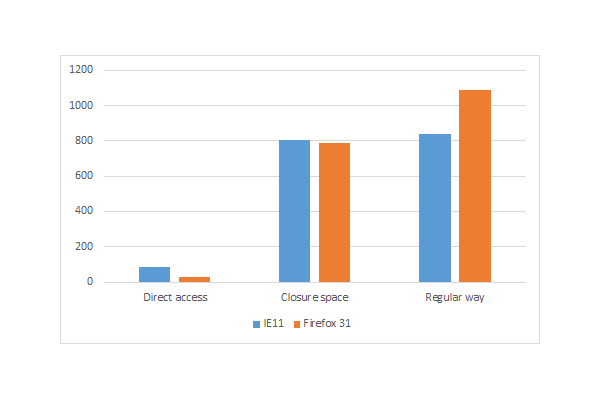
然而,如果仔细研究,你会发现,使用闭包空间或属性比直接访问变量成员要10倍左右。 因此,使用要恰当且谨慎。

Chart comparing Direct access closure space and regular way

我创建了一百万个对象,都有属性成员。要完成下面三个测试:

  • 执行 1百万次随机访问属性。

  • 执行1百万次随机访问闭包空间实现版本。

  • 执行1百万次随机访问常规get/set实现版本。

测试结果参见下面表格和图表:

Table of results for IE11 Chrome 36 and Firefox 31Chart of results for IE11 Chrome 36 and Firefox 31

我们发现,闭包空间实现总是快于常规实现,根据浏览器的不同,还可以做进一步的性能优化。

Chrome 上的性能表现低于预期。或许存在 bug,因此,为确认(存在 bug),我联系了 Google 项目组,描述发生的症状。还有,如果你打算测试在 Microsoft Edge —微软新发布的浏览器,在windows10 中默认安装—中的性能表现,你可以点击下载 。

然而,如果仔细研究,你会发现,使用闭包空间或属性比直接访问变量成员要10倍左右。 因此,使用要恰当且谨慎。

Chart comparing Direct access closure space and regular way


4. 内存占用(Memory Footprint)

我们也得验证该技术不会消耗过多内存。为测试内存占用基准情况,我写了下面代码段:

直接属性引用版本(Reference Code)

1
2
3
4
5
6
7
var sampleSize = 1000000;
 var entities = []; 
// Creating entities
for (var index = 0; index < sampleSize; index++) {
    entities.push({
            property: "hello world (" + index + ")"
});}

常规方式版本(Regular Way,get/set)

1
2
3
4
5
6
7
8
9
10
11
12
13
14
15
16
17
18
19
20
var sampleSize = 1000000;
  
var entities = [];
  
// Adding property and using local member to save private value
for (var index = 0; index < sampleSize; index++) {
    var entity = {};
  
    entity._property = "hello world (" + index + ")";
    Object.defineProperty(entity, "property", {
        get: function () { return this._property; },
        set: function (value) {
            this._property = value;
        },
        enumerable: true,
        configurable: true
    });
  
    entities.push(entity);
}

闭包空间版本(Closure Space Version)

1
2
3
4
5
6
7
8
9
10
11
12
13
14
15
16
17
18
19
20
21
22
23
24
var sampleSize = 1000000;
  
var entities = [];
  
var createProperty = function (obj, prop, currentValue) {
    Object.defineProperty(obj, prop, {
        get: function () { return currentValue; },
        set: function (value) {
            currentValue = value;
        },
        enumerable: true,
        configurable: true
    });
}
  
// Adding property and using closure space to save private value
for (var index = 0; index < sampleSize; index++) {
    var entity = {};
  
    var currentValue = "hello world (" + index + ")";
    createProperty(entity, "property", currentValue);
  
    entities.push(entity);
}

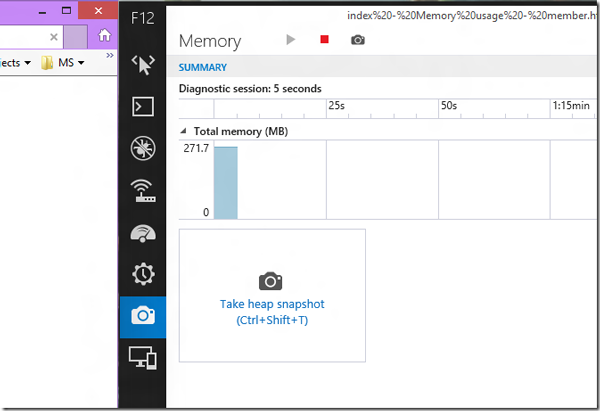
之后,我(在三个主流浏览器上)运行所有的三段代码,启动(浏览器)内嵌的内存性能分析器(本示例中使用 F12 工具条):

embedded memory profiler example here using F12 tools

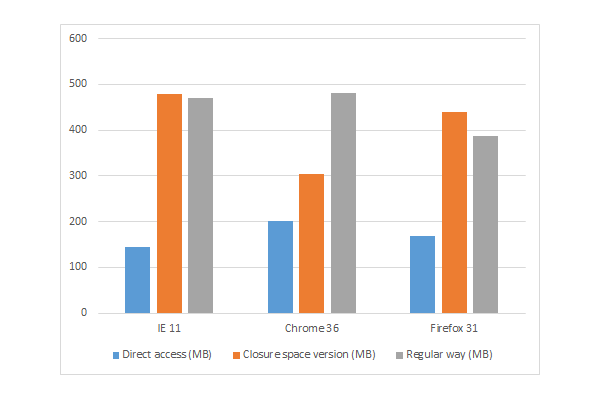
我计算机上运行的结果如下图表:

Chart of the results I got on my computer

就闭包空间和常规方式,只有 Chrome上,闭包空间(内存占用)表现稍好,在 IE11 和 Firefox上占用内存反而增多,但是浏览器的比较结果e—对于现代浏览器,用户很可能不会在意这点差别。


更多 JavaSc 实践

或许你会吃惊,微软提供了一批有关开源 Javascript 主题的免费学习材料, 我们正在发起一个任务,关于创建更多 Microsoft Edge 来临 系列。 查看我的文章:

或者我们团队系列:

以及一些免费工具:Visual Studio 社区,Azure 试用版和跨浏览器测试工具用于 Mac, Linux, 或者 Windows。


结论(Conclusion)

如你所见,对于创建真正的私有数据来讲,闭包空间属性(机制)是一个很棒的做法。或许你得面对内存消耗小幅度增加(问题),但就我的看法,这却很合理 (这个代价可以换取相对于常规方法更高的性能增长)。

随带说一句, 如果你要自己动手试试,所以代码可以在 here下载。 推荐一篇不错的文章, “how-to” on Azure Mobile Services here。


酷毙

雷人

鲜花

鸡蛋

漂亮
  • 快毕业了,没工作经验,
    找份工作好难啊?
    赶紧去人才芯片公司磨练吧!!

最新评论

关于LUPA|人才芯片工程|人才招聘|LUPA认证|LUPA教育|LUPA开源社区 ( 浙B2-20090187 浙公网安备 33010602006705号 )   

返回顶部